
Download VizUp – Polygon Reduction, 3D Optimization, Free & Secure Tool
Overview
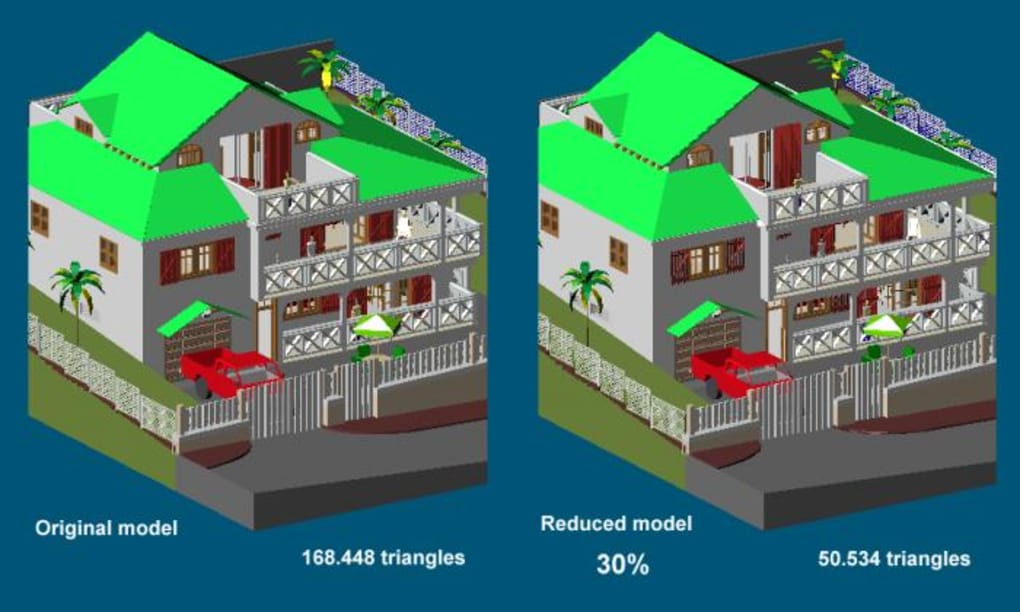
VizUp is a dedicated polygon‑reduction system designed for 3D artists, game developers, and VR engineers who need to balance visual fidelity with real‑time performance. Many 3D models created in high‑end modeling suites or exported from CAD programs contain hundreds of thousands—or even millions—of polygons. While such detail is ideal for offline rendering, it becomes a bottleneck for interactive environments, web‑based viewers, and virtual‑reality headsets. VizUp addresses this challenge by offering a fast, accurate, and fully automated workflow that trims excess geometry without sacrificing the essential shape and texture information.
The core of VizUp is its advanced reduction algorithm, which intelligently evaluates edge importance, surface curvature, and normal flow. Recent updates have introduced an advanced normals generation method, improved texture‑border preservation, and support for large files up to 3 GB of RAM address space. Additionally, the tool now handles stereo‑lithography (.STL) and Wavefront (.OBJ) formats with enhanced import/export pipelines, making it a versatile companion for both industrial CAD pipelines and artistic asset pipelines.
Beyond raw reduction, VizUp can generate Level‑of‑Detail (LOD) meshes, streamline assets for web delivery, and prepare models for real‑time engines such as Unity or Unreal. By shrinking file size, developers experience faster download times, reduced bandwidth costs, and smoother frame rates on low‑end hardware. The software is offered as a free download for Windows, with optional paid licenses for commercial use that unlock batch processing, priority support, and automatic update channels.
Key Features of VizUp
- Advanced polygon reduction algorithm that preserves visual quality even at aggressive reduction ratios.
- Support for STL, OBJ, and common CAD formats with lossless texture‑border handling.
- Integrated advanced normals generation for accurate shading after reduction.
- Automatic Level‑of‑Detail (LOD) creation for real‑time engines.
- 3 GB RAM address space support, allowing processing of very large models.
- Save‑selected‑parts capability to isolate and reduce specific mesh sections.
- Improved texture‑mapping quality using a proprietary advanced algorithm.
- Batch‑mode processing for large asset libraries.
- Free version for personal use; commercial license adds priority updates and support.
- Regular OTA updates that keep the reduction engine aligned with the latest GPU‑driven rendering techniques.
Installation, Usage & Compatibility
VizUp runs natively on Windows 10/11 (64‑bit) and is optimized for both Intel and AMD processors. The installer is a lightweight .exe that guides you through a typical wizard:
- Download the latest installer from the official website.
- Run the executable and accept the EULA; the installer will automatically detect your system’s available RAM and suggest optimal settings.
- Choose between the free personal edition or enter a commercial license key if you have purchased one.
- Complete the installation; a desktop shortcut and start‑menu entry will be created.
First‑time users can launch VizUp and load a model via the “Import” button. The interface presents a live preview of the original mesh alongside a real‑time reduction slider. As you move the slider, you can instantly see polygon count, texture integrity, and a rendered preview. For batch processing, select “Queue” from the main menu, add multiple files, define a target reduction percentage, and click “Start”. The software will automatically generate LOD levels if enabled.
System requirements are modest: a dual‑core CPU, 4 GB RAM (8 GB recommended for large files), and a GPU with OpenGL 3.3 support for preview rendering. Because VizUp relies on CPU‑intensive algorithms, the reduction speed scales with the number of cores, making multi‑threaded CPUs noticeably faster.
Pros, Cons, FAQ and Final Verdict
Pros
- Highly accurate reduction with minimal visual artifacts.
- Free personal version makes it accessible for hobbyists.
- Robust support for STL and OBJ formats, including texture borders.
- Built‑in LOD generation saves time for game and VR pipelines.
- Batch processing and large‑file support improve workflow efficiency.
Cons
- Windows‑only; no native macOS or Linux builds at this time.
- Advanced features (batch mode, priority updates) require a paid license.
- Very large models (>2 GB) may still cause long processing times on modest hardware.
Frequently Asked Questions
Can VizUp reduce models exported from Blender?
Yes. Export your Blender model as OBJ or STL, then import it into VizUp. The tool respects the original UV layout and will preserve texture borders during reduction.
Is there a command‑line version for automated pipelines?
A command‑line interface is included in the commercial edition. It allows you to script batch reductions and integrate VizUp into CI/CD pipelines for game assets.
How does VizUp handle normal maps?
The advanced normals generation method rebuilds vertex normals after reduction, ensuring that baked normal maps continue to look correct on the simplified mesh.
Can I preview the reduction before applying it?
Yes. The interactive slider provides a live side‑by‑side preview, showing polygon count, visual quality, and texture fidelity in real time.
Is there a refund policy for the commercial license?
A 30‑day money‑back guarantee is offered on all paid licenses, provided the request is made within the trial period and the license key has not been transferred.
Conclusion & Call to Action
VizUp delivers a rare combination of precision, speed, and usability for anyone who needs to shrink 3D models without compromising visual fidelity. Whether you are preparing assets for a WebGL showcase, a VR experience, or a real‑time game engine, the tool’s advanced reduction engine, LOD creation, and texture‑border preservation give you a professional edge. The free personal edition is generous enough for hobby projects, while the commercial license scales with enterprise needs through batch processing and priority support.
Ready to accelerate your pipeline and reduce download times for your users? Download VizUp today and start optimizing your 3D assets instantly.







